DigitalModel

Based on SWTDO
26.0. 0 .0

Related videos

				
					https://www.douyin.com/user/MS4wLjABAAAAPSeKMESbuuJM8ZgZ5YxIIgWRSNcaob6r0BwYElgzquk?modal_id=7474879426094796067&relation=0&vid=7331079525461265705


illustrate:

If no assembly is selected, the entire assembly is output to one file. If multiple parts are selected, each part is output individually as the current model. When “Multi-Configuration” is checked, all content is output to separate files, supporting TDO’s unique naming rules.

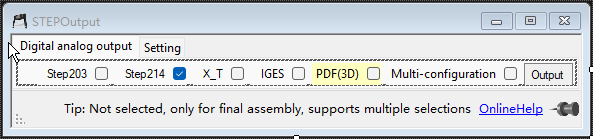
  • Multiple selection support: Assemble multiple selections/no selections
  • Document differentiation and avoidance: No avoidance
  1. Multi-body shading + digital model output STEP214 + rendering tools, one-step decomposition of part materials
  2. TDO format’s unique naming rules support multiple configuration step files (including plus signs) and Prod system-Prod file scanning.

Each configuration is output as an independent digital model, with the output file format conforming to the TDO multi-entity “plus sign” format.

System initialization
System Initialization
GetNo System
GetNo System
SmartRename
Smart Rename
QuickRename
Quick Rename
CreateView3
Create 3 Views
Prod System
Prod System
Drawing Output
Drawing Output
Model Output
Model Output
Path batch processing
Path Batch
Notepad
Notepad
Plugin System
Plugin System
SM Flatten
Sheet Metal Output
Bolt Statistics
Bolt Statistics
SpeedUP
Part SpeedUp
Random Color
Random Color
View Annotation
View Annotation
Body List
Body List
Format Properties
Format Properties
Backup System
Backup System
Drafting Standard
Drafting Standard
TitleBlockRep
Title Block Replacement
AI Assistant
AI Assistant
Self Test
Self Test
Property Manager
Property Manager
GenCode
Serialize DWG No
HPandR
Help & Activate
FixRefs
Fix References
OpenPath
Open Path
QIKNo
Quick GetNo
DataControl
DataControl
Scroll to Top