
bilibli
https://www.bilibili.com/video/BV1nZfHYSEMK/
https://www.douyin.com/video/7312887346859396388
https://www.bilibili.com/video/BV1LAwzewEgh/
When trying new tools, everyone tends to test with unused drawings — Body List, Sheet Metal Output, etc. If it involves weldment cut list properties, please be aware of the following:
Both sheet metal and weldments have cut lists. From SW2012 to SW2014, there was a major change — the cut list underwent fundamental changes, and the SW API changed significantly. SolidWorks weldment cut lists have long-standing bugs, such as incompatibility between Chinese and English, no updates, and formulas not recognizing property values.
Simply saving the file in a newer version does not fully upgrade cut list files created in SW2014 or earlier. These files have permanent limitations.
The Body List is one of the most complex programs in TDO, and much of the difficulty comes from bugs in the SolidWorks cut list.
However, we found that SW2026 can repair cut lists from older versions.
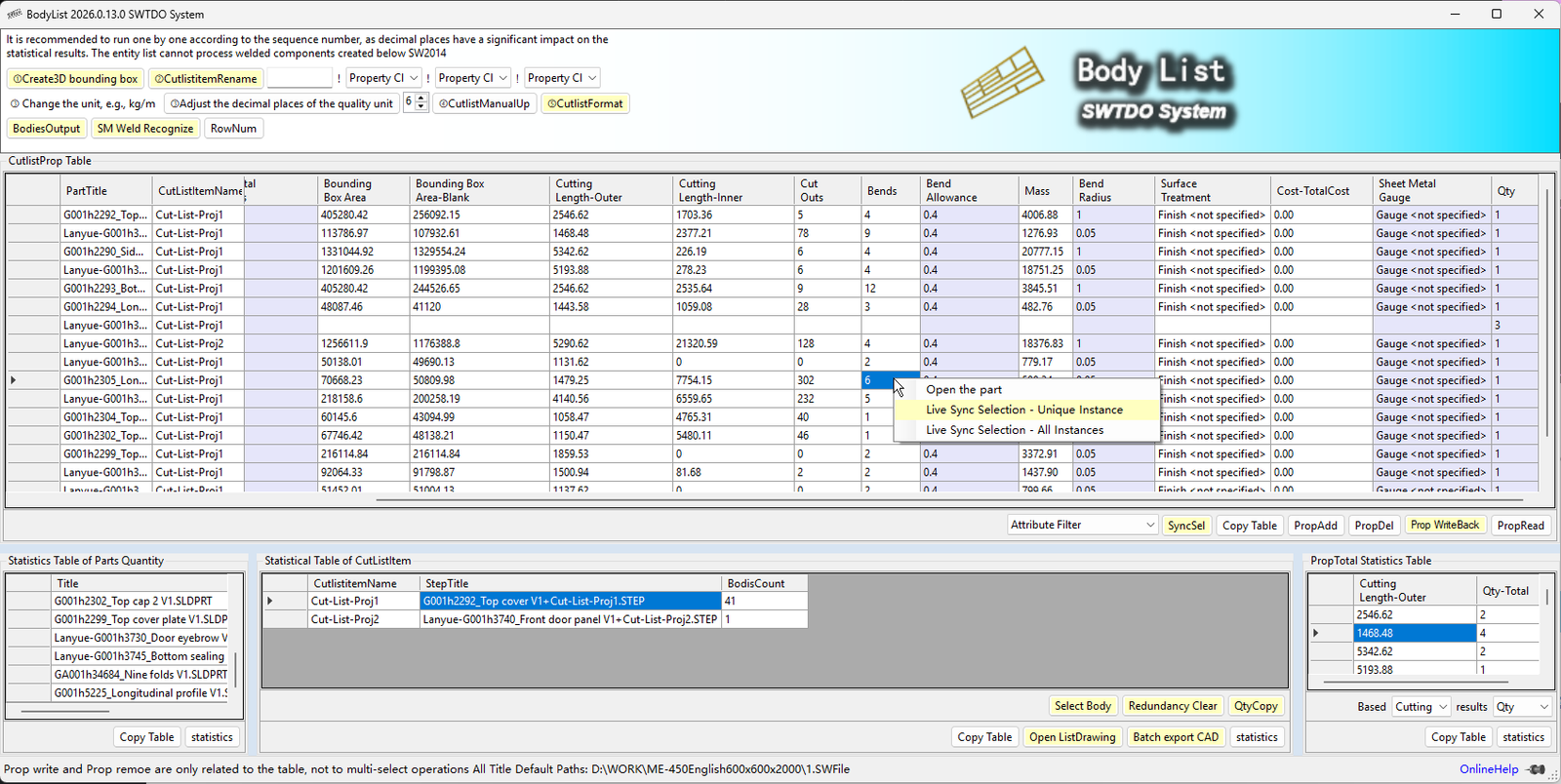
The Body List is designed for weldments. It supports statistics and direct entity output from cut lists without saving as separate parts. This is an operation that cannot be easily done with SolidWorks alone, but it is a critical part of production output.
It supports multi-selection of parts in assemblies (2019), multi-selection of cut lists in parts, annotation updates in drawing environments, batch input of cut list properties to all weldment sub-components in assemblies, and batch input of properties to all cut lists in parts.
Scenario example: 300 large test benches, 500 small test benches, 100 medium test benches. The cut list statistics table can count the total number of feet. If the model is drawn purely as weldments, this statistic cannot be completed in SolidWorks alone.
In a part, it has no meaning; but in an assembly, the cut list is used to count all cut lists with the same name. The significance is that we can calculate the quantity of same-name cut lists across different parts. When the same-name cut list represents identical geometry, the mass should also be identical (the Select Entity command supports multi-select entities in parts and batch material assignment). If statistics show same-name cut list items with different masses, accurate counting will not be possible.
Combined with cut list renaming in assemblies (Body List supports renaming cut lists based on properties, such as using 3D bounding box length/width/thickness, and supports batch processing of multiple cut lists in assemblies).
Combined Actions: Multi-select cut lists in assembly + Rename cut lists based on properties + Cut list statistics
It is consistent with Prod’s bi-directional data synchronization. Prod uses bi-directional selection based on part properties, while Body List uses bi-directional selection based on cut list properties.
Scenario example: 300 large test benches, 500 small test benches, 100 medium test benches. The cut list statistics table can count the total number of feet. If the model is drawn purely as weldments, this statistic cannot be completed in SolidWorks alone.
- According to the Description, the total length of all table legs can be calculated.
- Based on the thickness, the bounding box area can be calculated to determine the total blanking area of 3mm thick sheet metal.
- Based on the number of bends, it can count the total number of all sheet metal bends.
- Based on the materials, calculate the total mass.
- etc.
The formula is QTY * number of parts in the cut list attribute table.
If we’re calculating the length of profiles, the welded profiles will have a specification like 40x40x2 in their Description attribute (if not, we can use the welded profile attribute path batching in the Property Manager). Using the same profile will inevitably result in the same Description, allowing us to calculate the total length of all identical profiles based on this specification.
Pseudo-cutting quality is used to verify the uniqueness of the cut list item names for weldment entities, such as “file differentiation,” and is a functional attribute in TDO.
- Sheet metal entity: Actual value
- Processed Entity: Actual Value
- For profile entities: the blanking quality is a verification value because the actual quality of the profile cannot be calculated in SolidWorks using the cut list attributes. TDO (Technical Design Objects) obtains the profile quality by multiplying the 3D bounding box volume by the density.
The actual blanking weight of the profile should be obtained by calculating the total length based on the Description and then multiplying it by the “weight per meter” from the attribute total statistics table.
Export a unique STEP file for each cutting list.
Running under assembly, it supports multiple selections and deselection, and can output a unique entity list of all cuts for all sub-components.
When running under parts, in addition to supporting the output of all cut list entities, it also supports multiple selections of the cut list.
TDO standard CNV format: When the file format is TDO standard CNV format (code name version), the exported STEP file supports Prod’s Prod[+] scan to form a BOM.
Combined actions: Entity List Export (STP) + Batch Export to CAD + Prod System Scanning (i.e., 2D Drawings + 3D Drawings + BOM)
Supports batch export of DXF and DWG files, and supports multi-selection in tables.
Although the drawings are multi-body and multi-page engineering drawings, as long as the cutting list item appears in the cutting list statistics table, batch export of CAD is supported, including batch export of selected cutting list items on a single page.
Reads all cut list attributes under an assembly or part, supporting multi-selection of assemblies.
If the split list changes, please redo the formatting. Multiple selections are supported.
Complete the incomplete cut list attributes, quality, material formula, and cut list item names, and modify the cut list item names of the parts to be valid item names.
Cut list formatting standard attributes:
Density, cut list item name, MATERIAL, surface area, mass, code, name, version, subtotal mass, subtotal length
Density,CutlistItemName,MATERIAL,SurfaceArea,Mass,DWG No,Title,Ver,Subtotal Mass,Subtotal Length
For all STP files marked with a “+” sign within the SW folder, if the file cannot be found in the splitting list statistics table, it will be deleted directly. This is to ensure the smooth import of production documents into the database and prevent the import of irrelevant files.
Select entities: Under Parts, multiple entities can be selected.
Selected parts: Under Assembly, multiple parts can be selected (SW2019 and above).
Supports adding list properties directly to the welding and cutting list.
The entity list is the tool with the most program call levels in TDO, and the automatic updating of the cut list is the primary factor affecting welding operations. Therefore, we recommend that you disable the automatic updating of the cut list for parts, as it significantly impacts assembly performance.
- Method 1 for disabling TDO component acceleration commands
- Method 2 for closing: Directly modify the part template


