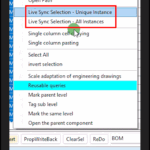
Relevant commands:
- Prod system – right-click menu – Live Sync Selection – Unique Instance
- Prod system – right-click menu – Live Sync Selection – All Instances
- SyncSel under all commands with tables
explanation
- The table data is sourced from components
- You can also search for parts from component data
- The parts of the interface can directly select data