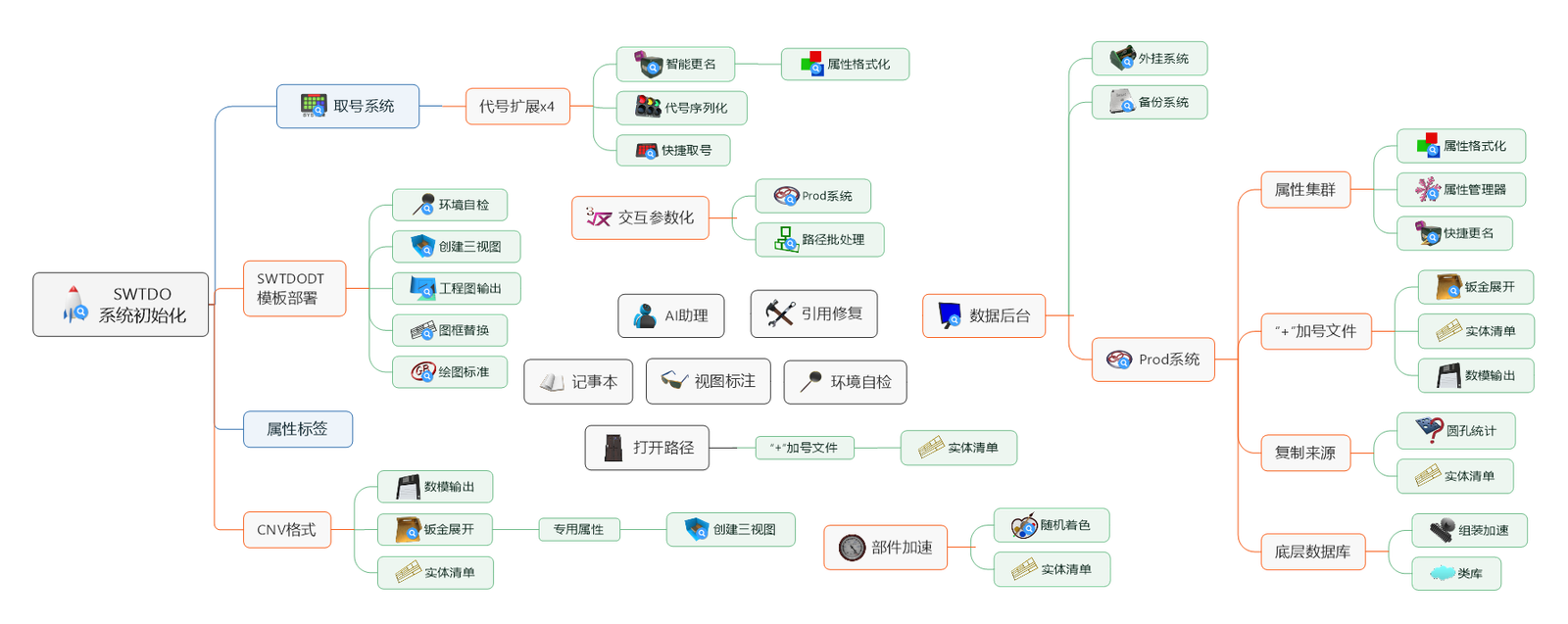
TDO Basic Module
Basic curriculum
Open Assembly – ① Property Format, ② Intelligent Rename, ③ Create Three Views, ④ Engineering Drawing Output, please click on each one.
Another thing I learned: all forms have online documentation.
- QQ Group:24728007
- QQGroup:490226538
- QQGroup:498438049
- Paid Limited:590761815
Installation Guide (Mobile version of this manual, WeChat Official Account: jixiezhaobiao)
SWTDO two accounts
※Forum Account
This account is unrelated to TDO usage and provides a wealth of resources for mechanical design, such as material libraries, welding contours, feature libraries, sheet metal libraries, electronic component libraries, and DWG symbol libraries. This account is manually added by our company, unlike regular registration.
Extension pack download address: https://www.mezbw.com/forum-36-1.html
※SWTDO software account
Both the online and offline versions come with a software account. For offline users, this account is valid for one month and is locked after that. Simply put, it’s used to get a refund.
The lifetime online version includes one offline activation code. This is for emergency use when you don’t have internet access; this activation has no expiration date.
Problem handling (limited to users who have placed orders)
Handling exceptions and bugs
- Did you see the prompts? SWTDO is different from overseas translation software; all prompts are in Chinese characters and written by Chinese people.
- Please upgrade (pay attention to the version number; all form titles have version numbers, and we only handle issues with the latest version).
Still can’t solve it:
- E-commerce customer service: Resolves sales issues, but lacks the ability to provide technical support.
- QQ: 14136837: Fixes installation issues and bugs to get the device working properly; no operation instructions provided.
- Recommended QQ group: 590761815. There are currently no other discussion groups. We usually answer all questions and share information about the principles behind some tools only in this QQ group.
acknowledge
All software copyrights, trademarks, and UI art copyrights of SWTDO are exclusively held by our company, Beijing Lanyue Technology Co., Ltd. Please use them only within the scope permitted by law.
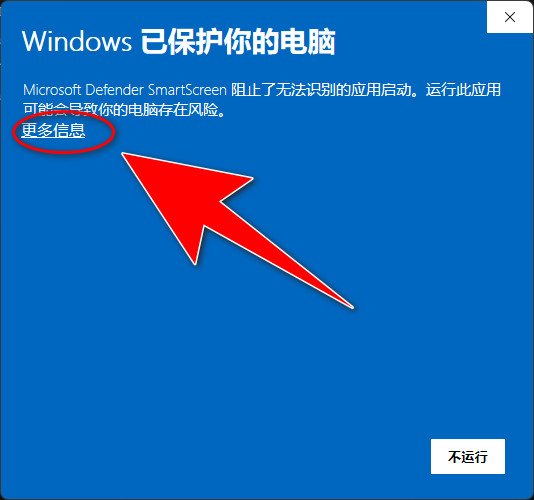
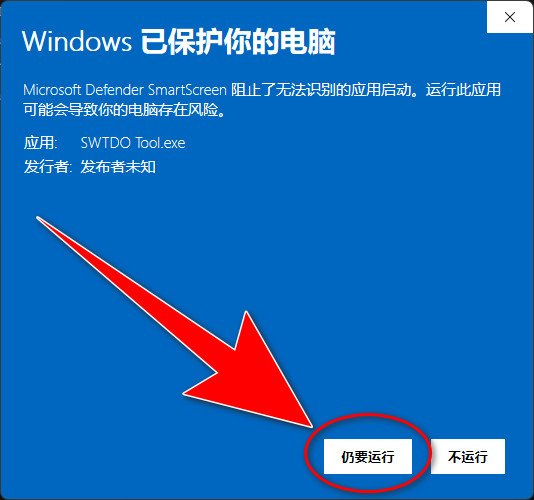
This software is a genuine domestic product and meets the legal requirements of any enterprise. Any abnormal firewall warnings are false alarms.What is a firewall?
Must-read for Node-Loked version

Machine code:
Everyone has fingerprints or other unique identifiers, and computers also have their own identifiers, called machine codes.
Obtaining the machine code must be done on the user’s computer.
Activation code:
An activation code can be obtained by encrypting the machine code using encryption software. Obtaining the activation code must be done by the encryption software, which is unique to our company and cannot be imitated by anyone else; that is, only our company can do it.
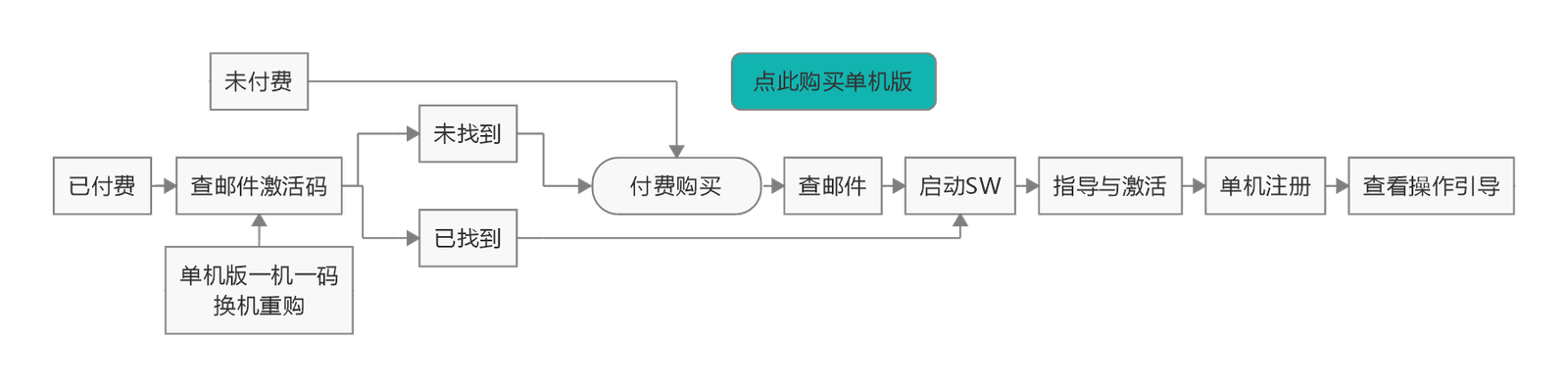
Standalone Activation: Click here for steps
1. The user uses their personal computer to extract the machine code (use the computer on which you want to activate the software) and sends it to us.
2. We use an encryption program to generate an activation code for that machine code and send it to the user.
3. The user enters the activation code into the software, which generates a license token, granting them the right to use the software.
No two machine codes are the same, so each PC’s token is unique. The machine code is independent of the programs, instructions, code, and system in the PC. Like a vehicle identification number, it is engraved on the hardware. Therefore, reinstalling the system does not affect the reuse of the activation code.
The online version does not require this process.
USB drive data
The content of the USB flash drive includes all component libraries from the following website before September 17, 2022. It is only used to reduce the download difficulty for users and is not related to TDO usage. However, there are instructions for using the expansion pack on the USB flash drive
USB flash drive content introduction: https://www.mezbw.com/thread-10657-1-1.html
refund
- No refunds will be given to users who have already received an activation code for the standalone version.
- Invoices are required, and refunds are not possible once the amount has been deducted.
- No refunds will be issued after one month.
- No refunds will be given for purchases of 1-on-1 coaching sessions and completion of at least 4 hours of online coaching.
Furthermore, we offer refunds for any issues such as dissatisfaction, inability to use the product, or dislike of its appearance, regardless of whether they are related to us. We do not argue with our users.
“I can’t use the internet and need to activate it immediately.” Please return the item immediately. Our e-commerce platform never experiences delays. Please be aware that there are far, far more rogue buyers than rogue sellers.
Install
- Disable UAC (User Account Control). Click here for instructions.
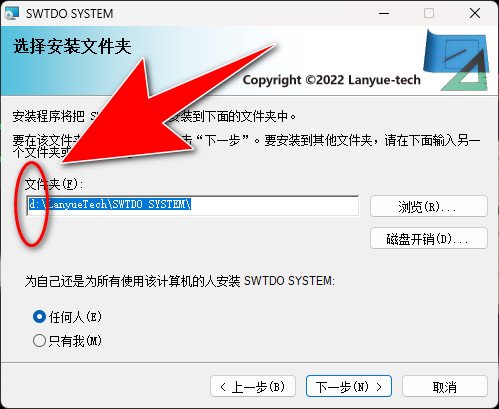
- Please double-click the downloaded file. setup.exe
- Please do not install the software on the C drive.
- If there is firewall blocking, see the image.
- Some commands require SWTDO initialization before they can be started. If multiple SolidWorks versions are installed, system initialization should be performed for each SolidWorks version.
Steps: Start SolidWorks – Tools – SWTDO Initialization – System Initialization
TDO involves three paths: software installation path, template deployment path, and workspace path. This software will create initialization files, database files, template files, etc. It is not recommended to use the C drive for any of these paths.
Recommendation: I recommend mastering TDO before making any personalized adjustments. TDO offers comprehensive customization. The installation process is straightforward, requiring only “Next” clicks for maximum efficiency and accuracy. If you get stuck on a small step, only solving a 2-point fill-in-the-blank question and neglecting the bigger picture, you’ll miss out on TDO’s 300 batch processing options and its ability to eliminate 90% of human errors.
upgrade
Start SW – Guidance and Activation – Update Check, or click here.
Download and extract the files, then install them to the old path. That’s it.
There is no initialization process, no template path modification process, which we have not written before. Please do not understand without authorization, and you do not need to do a word.
uninstall
- Launch SW Tools – System Options – Reset All
- Windows Control Panel, Uninstall
The following are Microsoft’s diagnostic tools; they are recommended for use when uninstallation encounters problems.
https://support.microsoft.com/en-us/topic/fix-problems-that-block-programs-from-being-installed-or-removed-cca7d1b6-65a9-3d98-426b-e9f927e1eb4d
System backup and restore
Windows Start Menu – SWTDO – DataControl – System Tools
This new version cannot use database backups from older versions, or perform system restores. It is a special edition for specific use only. It is intended only for when you have objections to the new version and wish to revert to the older version.
Advanced User Tutorial
More comprehensive videos
中国版:https://space.bilibili.com/647240799/lists
海外版:https://www.lanyue-tech.com/en/tdouiforvideo
SWTDO Guide (Make sure the Windows Microsoft Store is available)
- For other people’s batch processing: select file batch processing; For TDO batch processing: select part batch processing.
- 包含设计者主观判断的批处理,你可以预设的批处理,多工具组合使用的批处理
- TDO supports various batch processing methods, including single selection, multiple selection, no selection, box selection, table selection (SW selected), part selection (strain), and file differentiation and avoidance rules.
- Key point: TDO batch processing is not limited to the UI in the SW tab, but to all forms and all buttons under all frames, at least 70% (when we’re talking about free communication, we’ll say all our commands).
- TDO has five batch processing frameworks: batch processing of assembly parts, batch processing of path components, batch processing of part entities, batch processing of assembly cut lists, and batch processing of faces in assemblies or parts.
SWTDO program composition, detailed installation and uninstallation process
Taking the standalone version as an example, after installation, activation, and normal use, your computer will have 9 parts.
- License (not available for online version)
- Database files, configuration files
- SWTDODT template
- Source code
- Registry
- (Enterprise Edition) Module Database, Basic Database
- (Enterprise Edition) Module License
- (Enterprise Edition) Shared Configuration File
- (Enterprise Edition) Team Template
Upgrade:
(New version number < 0 > Old version number) will delete and overwrite version 4. Versions 1, 2, and 3 will remain in your original location >C:\Users\[User]\AppData\Local\LANYUE-TECH).
(New version number < 0 > = Old version number) will not instal<l. Please manually uninstall TDO from the Windows Control Panel and reinstall it.
If the installation location is changed during the upgrade, template 4 will also be automatically deleted (this may not be the case if the installation location is on the C drive). TDO will not be able to find templates 1, 2, and 3, and you will have to use the activation email to redo templates 1, 2, and 3. If you happen to have made a system backup, you can use System Restore to import templates 1 and 2 and re-identify them. If template 3 has not changed its location, it will be automatically recognized after importing template 2.
We do not back up SWTDODT, and it’s highly unlikely that you would simply throw away the templates you painstakingly processed.
Uninstall: Item 4 will be deleted (this may vary depending on the installation location, such as C drive). Items 1, 2, and 3 will remain in their original locations. Item 5 will be automatically cleaned up.
Environmental self-inspection and remediation only handles 3.
Numbers 6, 7, 8, and 9 are handled automatically by the server monitoring tool and do not require intervention.
TDO system backup and restore usage
It’s always a good idea to back up your data before each upgrade.
When performing a system restore, ensure that the backup version being restored is the same as the SWTDO version; that is, a newer version of the software cannot be used with an older backup.
The backup serves two purposes:
1. To store your usage license
2. To restore previous data if the database or configuration files are corrupted during the upgrade process.
Universal customization of any drawing format and template without discrimination
- It is only recommended that you use TDO’s default template file to modify your custom template.
- Unless you are an expert in setting up templates, the advanced tutorial “Customize Your Business Template” will help you forget about any other template tutorials you’ve taken; it’s sufficient for over 90% of businesses.
- Only users who are proficient in template settings can directly replace template files with the same name.
| command name | , | assuming your template path is D:\SWTDODT | |
| Drafting Standards | D:\SWTDODT\Drafting Standards | ||
| TitleBlockRep | D:\SWTDODT\Sheet Formats | ||
| Creating three views | A1-A4 | D:\SWTDODT\Document templates | |
| BOM | D:\SWTDODT\Bom templates | ||
| Cut List | D:\SWTDODT\Weldment Cut List Templates | ||
| GetNo | New | D:\SWTDODT\Document templates | |
| Sheet metal Flating | Sheet metal layout assembly | D:\SWTDODT\Document templates\OneFile.DRWDOT | |
| DrawOutput | DXF and DWG mapping | D:\SWTDODT\DWG Map | |
| Property tags | D:\SWTDODT\Custom Property Files | ||
| process field | D:\SWTDODT\Custom Property Files\Process.txt | ||
| Sheet metal surface Finish | D:\SWTDODT\Custom Property Files\Finish.txt | ||
| Spraying fields | D:\SWTDODT\Custom Property Files\Paint.txt | ||
| 部件区分 | D:\SWTDODT\Custom Property Files\PartType.txt | ||
| File Type | Note! Manual modification is not allowed; only initialization modifications are permitted. | D:\SWTDODT\Custom Property Files\FileType.txt |
File types not supported by SWTDO
- Lightweight components
- Virtual components
- Compression components
- Unsaved parts
- ToolboxParts
- TempFile
Regarding workspaces and project folders
The TDO workspace corresponds to the SW system options – file location – referenced file.
In simple terms: SW monitors any file that SW is operating on, but it doesn’t have enough resources to store the relationships between every single file. Instead, it stores these relationships as file pointers within each file. For general designers, file pointers have advantages, but also serious drawbacks. Different versions also have some bugs. TDO’s working area is equivalent to the monitoring range of BeiDou. Within this range, we can guarantee SW’s indexing rules. Outside this range, it’s SW’s limitation, not TDO’s limitation. TDO’s strict requirements are to ensure your work is foolproof.
SW has no authority to monitor Windows operations; any copying or pasting may disrupt SW file relationships. To put it bluntly, only a novice would use copying and pasting to manipulate SW files.
Counterexample to the principle of correspondence between files (component engineering drawing DWG)
A typical counterexample (TDO will not be usable)
- A project has 10 parts, corresponding to one engineering drawing file (containing 10 drawings).
One-to-one correspondence in TDO (Trust of Dots)
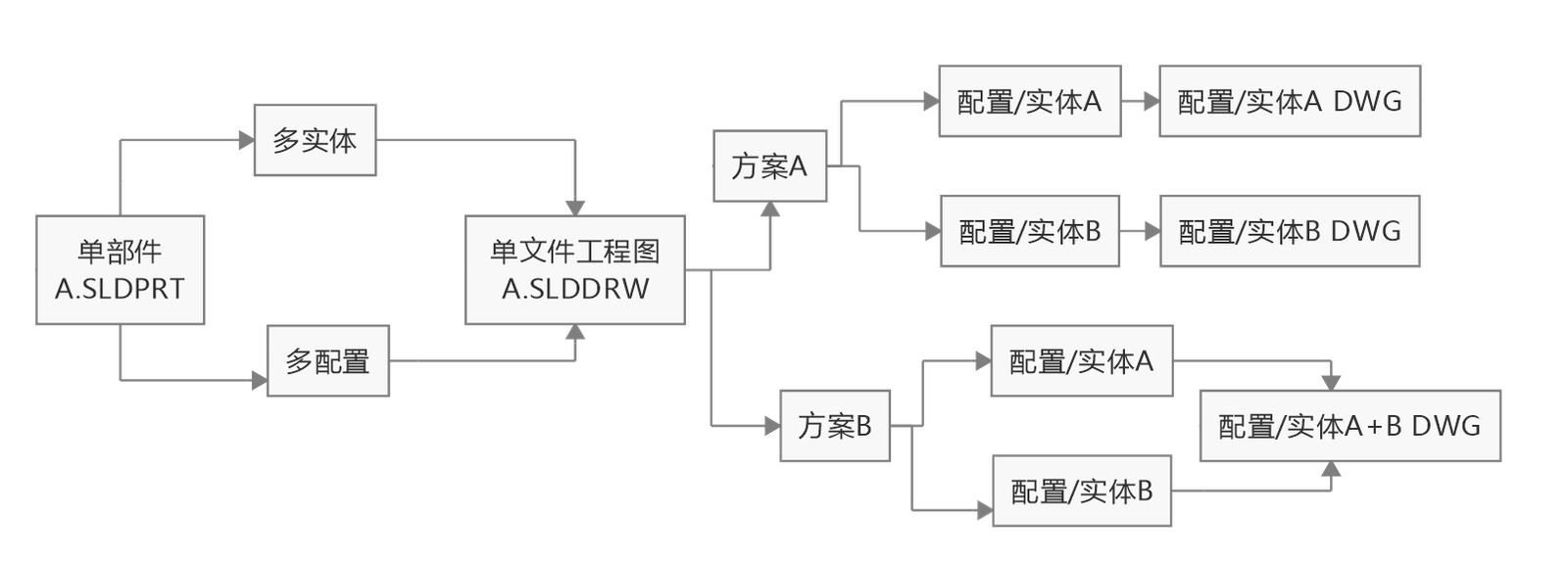
One engineering drawing per component, or 10 DWG files (multi-entity/multi-configuration).
If the component is a multi-body
For each component, one engineering drawing (which can contain 10 solid drawings), one DWG (which can contain 10 solid layouts), or 10 DWGs.
If the component is multi-configuration
For each component, one engineering drawing (which can contain 10 configuration drawings), one DWG (which can contain 10 configuration layouts), or 10 DWGs.
Each assembly can have 10 BOMs.
TDO output = Drawings + BOM
delimiter
We typically use underscores and spaces as file separators to distinguish between code names, names, and versions.
What is a delimiter? A delimiter is a string that can be split using fixed symbols. The resulting segments are then applied to the code. The task of a delimiter is to cut a string into three parts.
User application usage principle: In principle, the same string should not have repeated delimiters, unless it is a delimiter preset by the programmer. That is, TDO code can have duplicates by default, but users must avoid them. This is because the execution logic is preset by the code.
TDO Dictionary
Brake key
During batch processing, you can find the TDO brake switch in the tray menu at the bottom right of Windows. Left-click to stop the loop.
It should be noted that the brake button only works within a task’s loop node. It does not stop program execution until the task has completed its current loop. In other words, in most cases, the brake button does not immediately stop the process, but it will halt batch processing before executing the next component.
The brake button does not work for all batch processes; some batch processes are unaffected by the brake.
Suggestions for customizing and modifying SWTDODT default template
| path | suggestion | File name can be changed | Additional | Same name replacement | |
|---|---|---|---|---|---|
| Default Template – Parts | D:\SWTDODT\Document templates\Part.PRTDOT | It should be modified based on the TDO default template. | No | ||
| Default Template – Assembly | D:\SWTDODT\Document templates\Assembly.ASMDOT | It should be modified based on the TDO default template. | No | ||
| Default Template – Engineering Drawing | D:\SWTDODT\Document templates\A4P.DRWDOT | It should be modified based on the TDO default template. | No | ||
| Document Template | D:\SWTDODT\Document templates | No | yes | ||
| Drawing Standards | D:\SWTDODT\Drafting Standards | No | No | Yes | |
| Macro | D:\SWTDODT\Macros | ||||
| Material Database | D:\SWTDODT\Material Databases | ||||
| Drawing format | D:\SWTDODT\Sheet Formats | It should be modified based on the TDO default template. | No | Yes | |
| Welding Parts Cutting List Template | D:\SWTDODT\Weldment Cut List Templates | yes | yes | yes | |
| Revise form template | D:\SWTDODT\Revision Table Templates | ||||
| Block | D:\SWTDODT\Blocks | ||||
| Color swatch | D:\SWTDODT\Color Swatches | ||||
| Customize – Appearance | D:\SWTDODT\Custom Appearances | ||||
| Design Log Template | D:\SWTDODT\Design Jounal templates | ||||
| Design Library | D:\SWTDODT\Design Library | ||||
| Common Sizes/Notes | D:\SWTDODT\Dimension | ||||
| weldment outline | D:\SWTDODT\Weldment Profiles | ||||
| Custom property file | D:\SWTDODT\Custom Property Files | FileType.txt,Manual modification is prohibited, but modifications can be avoided by using the initialization file. | yes | ||
| Punching template | D:\SWTDODT\Punch Table Template | ||||
| Reference documents | E:\WORK | Please review the workspace and project folders; modification is not recommended. | |||
| DWG mapping template | D:\SWTDODT\DWG Map\DWG Map | TDO’s mapping templates differ from common ones; we recommend using ours. | yes |
Migration operations for different PCs
For network version users, PC use is not restricted. Some information is synchronized, and the operation steps are seamless. [The following operations are only applicable to SWTDO 2025.0.43 and above, and the TDO version number must be the same for both the old and new PCs.]
- Old PC: Datacontrol – System Tools – System Backup, Export Back
- New PC: Datacontrol – System Tools – System Restore
Abnormalities caused by environment switching
Solidworks APIs depend on the runtime environment, such as the part environment, drawing environment, and assembly environment.
In assembly A, launch the TDO Property Manager.
The Property Manager is open (not closed). If part B is open at this time, directly using the Property Manager on part B (or assembly C) will cause some tools to malfunction.
Correct procedure: Under part B, restart the Property Manager.
Important note: The command you use to start the application is specific to the component you are using. Normal operation is only guaranteed under this specific component. Switching environments may cause issues.
Example 1: Starting a command form from A, switching to B (without closing the command form), switching back to A, and continuing to use the command form, OK.
Example 2: Starting a command form from A, switching to B (without closing the command form), and using the command form in B, NG.
Example 3: Starting a command form from Assembly A, switching to Part B (without closing the command form), and using the command form in B, NG.
The above explanation applies to most TDO commands, including those with command preloading, presets, and data querying.
The principle is exactly the same as the requirement for a restart when patching Windows.
Preloading examples: Property Manager, Quick Rename, Entity List, Frame Replacement, Environment Self Check, Create Three Views
Data query examples: Prod system, backup system, interactive parameterization, class library, screw library