
Cascade
Solution to Cascade Error:
Please go to the GetNo System, manually change the component serial number to a larger number (e.g. 100000), then create a new part.
- Older versions of SOLIDWORKS had a native plugin called SOLIDWORKS Explorer, whose most important function is to act as a SW file pointer modifier.
- TDO Cascade works similarly — it modifies data references, but TDO does not touch SW files, only the TDO database.
When you create a BOM table, a backup, or a parametric equation library from an assembly, the result is associated with that assembly. This association is based on database table relationships.
Example: You create a backup or Prod list from Assembly A. If Assembly A is later renamed to B, the backup data can no longer find A, resulting in data loss (only the record is lost, the actual files remain).
Cascade: When the assembly file changes, the data table automatically follows the change.
The above is the simplest form of cascade. There are also project-assembly cascade, part-assembly cascade, single part to multiple assemblies, multiple projects to single assembly, parameter library to parametric part cascade, cascade upgrade, cascade delete, etc. This is a database concept.
Key point of Cascade: Global uniqueness of Filename + Configuration
In SWTDO EntPDM, UUID distributed primary keys are used to support enterprise-wide data cascading.
Entity
This concept comes from the SOLIDWORKS CSWP manual. It generally refers to all entities (lines, points) or closed areas (faces) in a drawing.
Base Feature, Unit
In a part, the entity is the Base Feature, and the part is the Unit.
In an assembly, the part is the Base Feature, and the assembly is the Unit.
Property Cluster
A Property Cluster can be divided into two parts by composition:
- Basic Property Set
- Current Assembly Property Set
By property type, it is further divided into:
- File Property Set
- Entity List Property Set
Basic Property Set
- The basic property set for file properties comes from Prod system settings;
- The entity list property set comes from SOLIDWORKS built-in Cut List properties for all entity types (sheet metal entities, extrusion entities) and commonly used calculation units in our design work, such as density, subtotal mass, etc.
Current Assembly Property Set
- When any assembly is opened by the user, TDO extracts all configuration-specific properties and all custom properties of all parts under the assembly to form a new property collection. This collection is dynamically changing.
- The Cut List property set is the same as above, but comes from the Cut List properties of all weldment parts under the assembly.
TDO defines “Property Cluster” = Basic Property Set + Current Assembly Property Set, taking the intersection
In the Property Manager, there are several special properties, such as Chinese characters and transfer values.
Functional Property
Similar to “TDO_TopViewFlatMark” and “TDO_MarkAreaSum”
In SWTDO, some properties are dedicated to completing specific commands.
Current Project
During Self Test, a default project location is provided. This project will automatically switch according to user operations. TDO calls this the Current Project.
CNV Format, Standard Format
DWG No*Title*Ver, “*” is the separator
TDO Format Unique Naming Rule
Components using TDO standard CNV format and those not using standard format will produce different output results.
For example, Model Output command, Entity List, Sheet Metal Output — the output file names will be generated in 2 different formats based on the component’s current name.
File Type Avoidance
In SWTDO, there are over 300 batch processing methods based on loop logic. The code does not determine which files should be batch processed or skipped based on the designer’s subjective intention.
Example Scenario
For purchased parts, we do not need to create drawings. This is a component that requires manual intervention and active avoidance. In addition to manually selecting purchased parts to avoid, we also provide a manually marked avoidance method.
Assume your assembly has 1000 components and you want to batch output them. Manually avoiding them in large batches is impossible. However, batch-adding avoidance properties in small batches is feasible and is the only practical batch processing solution.
“File Type” is a dedicated functional property
During initialization, if components under this property are explicitly set not to be batch processed, most SWTDO batch processing logic will skip components with this property.
For reference only
Maximum Serial Number
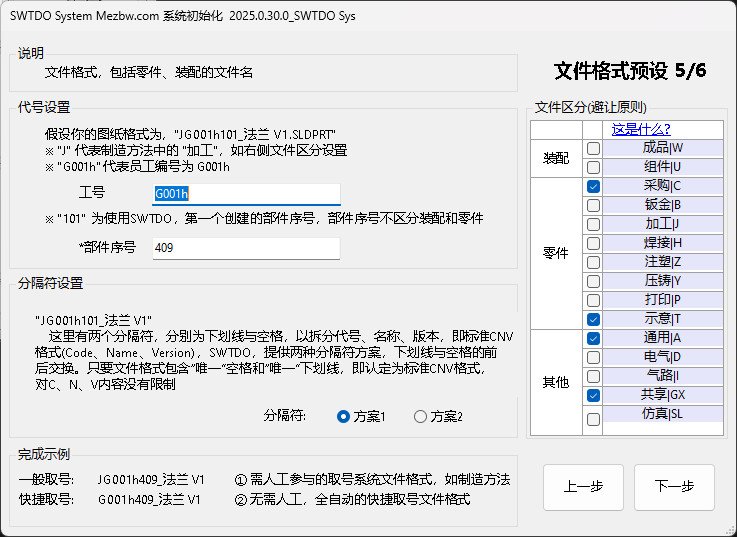
During initialization, this refers to the last number generated on this computer after using our software. In the enterprise version, this is the last number generated by all 30 designers in sequential order. Ideally, initialization should be done only once in a lifetime to ensure no duplication. Since reinstallation is inevitable, we require that the initial serial number you set must be greater than the maximum serial number of your previous PC.
Local
Refers to your own PC, as opposed to the enterprise version’s LAN server.
Component
Part and Assembly
Unit
Sub-assemblies that are different from the top-level assembly. In the “Finished Product Judgment” property, “Unit” refers to 2nd or 3rd level assemblies below the top-level assembly. In many ERP systems, they are often called “Semi-finished Product”.
Finished Product
Top Assembly, Finished Product
ToolboxPart
This term appears only in the Prod system and is used only to identify parts called from Toolbox. It is used to distinguish from “Standard Part” and is not user-definable.
Standard Part
Fasteners, consumables, ready-to-use upon purchase
MATERIAL
Material: In SOLIDWORKS, “MATERIAL” and “材料” are treated as different properties. Since the official library files only contain the MATERIAL field, this program does not use “材料”.
Please note: In SOLIDWORKS, some terms cannot be used interchangeably even if their Chinese and English meanings are exactly the same.
Description
Description, same as above
File in Use
For example, if an image or DXF is opened by another viewer, Windows cannot perform parallel operations on it. TDO also cannot operate on files that are already in use.

